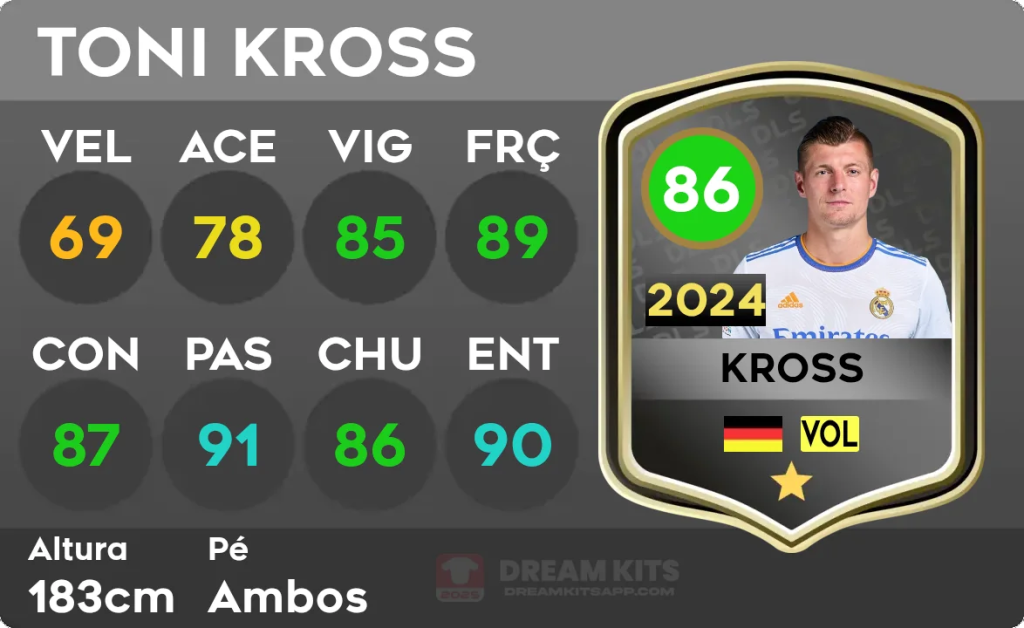
Are you ready to design the ultimate Dream League Soccer team? While you can build an impressive squad within the game, sometimes you want to imagine a team with legendary players, custom stats, or even put yourself on the pitch. That’s where the DLS Card Creator comes in. It’s a popular tool that lets you design and customize your very own DLS player cards, giving you a chance to bring your dream team to life.
This guide will walk you through everything you need to know about the DLS Card Creator. We’ll show you how to find and use the tool, explain all the customization options available, and provide tips for designing cards that look authentic and professional. Whether you’re creating a card for your favorite football hero or designing one for yourself, you’ll learn how to craft the perfect player card to share with friends and fellow DLS fans.
What is the DLS Card Creator?
The DLS Card Creator is an unofficial, fan-made online tool that allows users to create custom player cards that mimic the style of those in the popular mobile game Dream League Soccer. It’s not a feature within the game itself but rather a separate website or app designed for creative expression.
With this tool, you can design cards for any player you can imagine—from current superstars and football legends of the past to local players or even yourself. You have complete control over every element of the card, including the player’s name, photo, stats, position, and nationality. It’s a fun and engaging way for the DLS community to share their passion for football and create unique content.
Getting Started: How to Use the DLS Card Creator
Using the DLS Card Creator is straightforward. Since there are several fan-made versions available online, the exact layout might differ slightly, but the core process remains the same.
Follow these simple steps to create your first card:
- Find a DLS Card Creator Tool: Start by searching for “DLS Card Creator” or “Dream League Soccer Card Maker” in your web browser. Several websites, like dlscardcreator.com, are dedicated to this purpose. Choose one that looks user-friendly and up-to-date.
- Select a Card Template: Most creators offer different card designs based on various versions of the game (e.g., DLS 24, DLS 23) or special event cards. Pick the template that best fits the look you’re going for.
- Upload a Player Image: This is where your card starts to take shape. You’ll need a clear, high-quality photo of your player. For the most authentic look, use an image with a transparent background (a PNG file) so it blends seamlessly with the card design.
- Enter Player Details: Fill in the essential information for your player, such as their name, nationality (by selecting a flag), and club affiliation.
- Assign Stats and Position: Now for the fun part. Assign ratings for the six key attributes: Speed (SPE), Acceleration (ACC), Stamina (STA), Control (CON), Tackling (TAC), and Shooting (SHO). These values will automatically calculate the player’s overall rating. You also need to set their position on the field (e.g., GK, DF, MF, FW).
- Customize Your Card: Once the basics are in place, you can fine-tune your card. Adjust the font colors, choose the card rarity (Common, Rare, Legendary), and add any other special touches the tool offers.
- Download and Share: After you’ve perfected your design, download the final image. The card is now ready to be shared on social media, in fan forums, or with your friends.
Customizing Your Player Card in Detail
The real magic of the DLS Card Creator lies in its customization options. Let’s explore each element so you can design a card that truly stands out.
Player Image and Background
The player’s picture is the most important visual element. For best results, find a high-resolution image where the player is clearly visible. Many users use photo editing software like Adobe Photoshop or free online tools like remove.bg to erase the background before uploading. This gives the card a professional finish, just like the official cards in the game.
Player Name, Club, and Nationality
These details establish the identity of your player. When entering the name, be sure to use the correct spelling. For the club and country, most card creators provide a dropdown menu with logos and flags, making it easy to select the right ones and maintain an authentic look.
Player Stats (Ratings)
The stats are the heart of any DLS card. The six attributes determine the player’s overall rating and their effectiveness in the game. Here’s a quick breakdown:
- SPE (Speed): The player’s top running speed.
- ACC (Acceleration): How quickly the player reaches their top speed.
- STA (Stamina): How long a player can perform at a high level before getting tired.
- CON (Control): Dribbling ability and how well the player handles the ball.
- TAC (Tackling): Defensive skill in winning the ball back.
- SHO (Shooting): Accuracy and power when taking a shot.
When setting these stats, try to be realistic. A legendary striker might have a SHO rating in the 90s, while a solid defender would have a high TAC rating. The overall rating is calculated automatically based on these individual stats.
Card Rarity and Color
The color of the card often signifies the player’s rarity and overall rating in Dream League Soccer:
- Common (White/Gray): For lower-rated players.
- Rare (Blue): For mid-tier, solid players.
- Legendary (Gold/Black): For elite, world-class players.
Choosing the right rarity adds another layer of authenticity to your creation. Some creators also offer special edition card designs, like “Team of the Week” or “Icon” cards, which come with unique color schemes.
Create Your Ultimate Team
The DLS Card Creator is more than just a fun tool; it’s a way for fans to engage with the game on a creative level. By designing your own player cards, you can celebrate your favorite football heroes, create versions of players from different eras, or even imagine yourself playing alongside the greats. With a bit of practice and an eye for detail, you can produce professional-looking cards that will impress the entire DLS community.
Now that you know how it works, it’s time to start designing. Find a card creator tool, gather your images, and let your imagination run wild.