For phone and electronics repair shops, the stockroom is where profitability is won or lost. A well-organised inventory system ensures technicians have the right parts when they need them, reduces waste from expired or obsolete stock, and provides accurate data for purchasing decisions. However, many small repair businesses rely on manual tracking methods that are prone to errors, leading to costly mistakes that erode margins and frustrate customers.
Inventory management software designed specifically for repair shops addresses these challenges by automating tracking, linking parts to repair jobs, and providing real-time visibility into stock levels. This article examines the most common stockroom mistakes and how purpose-built software prevents them before they impact your bottom line.
Common Stockroom Mistakes in Repair Shops
Running Out of Critical Parts at Peak Times
One of the most frequent and costly errors is discovering a part is out of stock only when a technician opens a repair ticket. This scenario creates a cascade of problems: the repair is delayed, the customer must be contacted and informed of the wait, the device occupies bench space while awaiting parts, and cash flow is tied up in incomplete jobs.
Manual inventory systems, whether paper-based or spreadsheet-driven, cannot provide real-time visibility into stock levels. Staff may believe a part is available based on outdated records, only to find the shelf empty. Without automated low-stock alerts, reordering happens reactively rather than proactively, often after stockouts have already occurred.
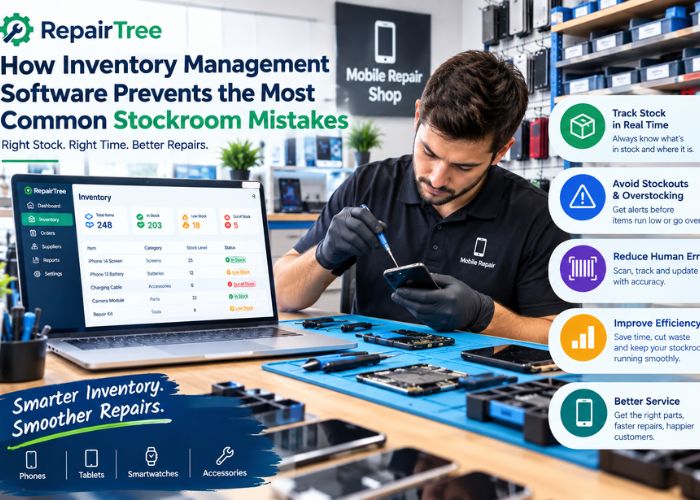
How software prevents this: Dedicated inventory management software tracks stock levels in real-time and automatically deducts parts when they are logged against repair jobs. Low-stock alerts trigger when inventory falls below predefined thresholds, prompting timely reordering before stockouts occur. Some systems can even generate purchase orders automatically based on reorder points and historical usage patterns.
Using the Wrong Part for a Device Model
Phone manufacturers release multiple variants of popular models, often with subtle differences in screens, batteries, or connectors that are not interchangeable. A technician grabbing the wrong iPhone 13 screen (for example, mixing up standard and Pro models) wastes time, risks damaging the device, and may create a non-billable repair if the customer refuses to pay for the error.
Manual systems rely on technician memory or handwritten labels that can be unclear or outdated. Without systematic tracking, parts from different models can be stored together, increasing the risk of selection errors.
How software prevents this: Inventory software links parts to specific device models and variants, often using IMEI or serial number tracking to ensure exact matches. When a technician creates a repair ticket, the system can suggest or require the correct part based on the device model entered. Barcode scanning further reduces errors by requiring technicians to scan the part before use, with the system validating that the scanned item matches the repair job.
Losing Track of Parts Used on Repairs
In busy shops, technicians may pull parts from inventory without logging usage, either to save time or because the process is cumbersome. Over time, this creates significant discrepancies between recorded and actual stock levels. The business may believe it has inventory that has already been consumed, leading to unexpected stockouts and inaccurate profitability calculations.
Manual tracking requires technicians to remember to update spreadsheets or paper logs after each repair, a step that is easily skipped when workload is high.
How software prevents this: Integrated repair and inventory systems automatically deduct parts from stock when they are logged against a repair ticket. Technicians select the part used from a dropdown or scan a barcode, and the system updates inventory in real-time. This linkage also provides accurate job costing, showing exactly which parts were used on each repair and their associated costs.
Overordering Slow-Moving or Obsolete Parts
Without visibility into usage patterns, shops often overorder parts that sell infrequently while underordering fast-moving items. This ties up capital in dead stock that may become obsolete as device models change. For example, screens for older iPhone models lose value rapidly as fewer customers repair aging devices.
Manual systems provide limited analytics, making it difficult to identify which parts are moving and which are stagnating.
How software prevents this: Inventory software tracks parts usage over time, generating reports on turnover rates, days of stock on hand, and slow-moving items. This data enables informed purchasing decisions, ensuring capital is allocated to parts that generate revenue rather than sitting on shelves. Some systems can flag parts that have not moved in a specified period, prompting clearance sales or targeted promotions to free up cash and shelf space.
Failing to Track Serialised or High-Value Inventory
Phones, tablets, and certain high-value components like logic boards have unique serial numbers or IMEI codes that must be tracked for warranty, insurance, and theft prevention purposes. Manual systems struggle to maintain this level of detail, especially when devices move through multiple stages from intake to repair to collection.
Without serial tracking, shops cannot easily prove which specific device was repaired for a given customer, creating vulnerability in warranty disputes or insurance claims.
How software prevents this: Purpose-built repair shop software supports serialised inventory tracking, allowing staff to scan and record IMEI or serial numbers at intake and link them to repair tickets. The system maintains a complete history of each device, including all repairs performed, parts replaced, and warranty claims. This audit trail protects the business in disputes and provides valuable data for identifying recurring issues with specific devices or batches.
Inaccurate Stocktakes and Reconciliation Errors
Periodic stocktakes are essential for verifying inventory accuracy, but manual counts are time-consuming and error-prone. Staff may miscount, skip items, or record data incorrectly, leading to discrepancies that are never resolved. Without a systematic approach, stocktakes become a chore rather than a tool for continuous improvement.
How software prevents this: Inventory software streamlines stocktakes by generating count sheets based on current system records. Staff can use barcode scanners or mobile devices to count and record stock quickly, with the system automatically flagging discrepancies between counted and recorded quantities. Variance reports highlight items requiring investigation, making it easier to identify theft, data entry errors, or process breakdowns.
Multi-Location Confusion and Double-Ordering
Shops operating multiple locations face additional complexity in coordinating inventory across sites. Without centralised visibility, one location may overorder a part while another has excess stock, leading to imbalanced inventory and unnecessary purchasing.
Manual systems require phone calls or emails to check stock at other locations, a process that is slow and often skipped when staff are busy.
How software prevents this: Cloud-based inventory systems provide real-time visibility into stock levels across all locations from a single dashboard. Managers can see which parts are available at each site, transfer stock between locations as needed, and avoid duplicate ordering. Some systems support location-based reorder points, ensuring each site maintains appropriate stock levels based on local demand patterns.
Additional Benefits of Inventory Management Software
Improved Cash Flow Management
By preventing overordering and reducing dead stock, inventory software frees up capital for more productive uses. Accurate stock data enables just-in-time purchasing, reducing the cash tied up in inventory while ensuring critical parts remain available.
Enhanced Supplier Negotiation
Detailed usage reports provide leverage when negotiating with suppliers. Shops can demonstrate consistent purchase volumes, request volume discounts, or justify switching suppliers based on pricing and delivery performance data.
Reduced Technician Downtime
When parts are easy to find and reliably in stock, technicians spend less time searching shelves or waiting for deliveries and more time completing billable repairs. This improves overall shop throughput and revenue generation.
Better Customer Satisfaction
Accurate inventory prevents the frustration of promising quick turnarounds only to discover parts are unavailable. Customers receive reliable estimates and timely repairs, improving satisfaction and repeat business.
Conclusion
The common stockroom mistakes that plague repair shops, from stockouts and wrong parts to lost inventory and overordering, all stem from inadequate visibility and manual tracking processes. Inventory Management Software designed specifically for repair businesses addresses these challenges by automating tracking, linking parts to repair jobs, providing real-time alerts, and generating actionable analytics.
The investment in purpose-built inventory software pays for itself through reduced waste, improved cash flow, faster repairs, and better customer satisfaction. For shops still relying on spreadsheets or paper logs, the transition to automated inventory management represents a critical step toward operational maturity and sustainable profitability.
Repair Tree offers integrated inventory management capabilities as part of its comprehensive repair shop platform, enabling businesses to track parts in real-time, link inventory to repair tickets, set automated low-stock alerts, and gain visibility into usage patterns that drive smarter purchasing decisions.