As someone who has managed hundreds of social media accounts over the past few years—for clients, brands, and my own projects—I’ve seen what works and what doesn’t. If you’re just getting started with managing more than one account on platforms like Facebook, Instagram, or Twitter, you might be wondering: How do I do this without getting banned?
In this guide, I’ll share what I’ve learned and how you can manage multiple accounts smoothly and safely, even if you’re a beginner.
Why I needed multiple accounts in the first place
Running several accounts isn’t about spam or fake activity. It’s about being smart with your strategy. I manage accounts for different clients, each with their own goals. Some accounts are for e-commerce stores, others for content creators, and some for personal brand testing.
Having more accounts gives you more reach, lets you test different content styles, and helps you grow faster. But it also comes with risks—especially if you use the same device, IP address, or browser settings for all of them.
My early mistakes (So you don’t repeat them)
In the beginning, I used to log in and out of different accounts on the same browser. I didn’t know that social media platforms track your device and browser fingerprint. Eventually, accounts started getting locked, flagged, and in some cases, banned.
I also used basic VPNs to try to change my IP. It helped a little, but it didn’t solve the bigger problem: the system still knew I was using the same browser and device for all my accounts.
The real reason accounts get banned
If you’re wondering why social media platforms ban multiple accounts, here’s the short answer: they can detect when multiple accounts are being controlled from the same environment.
Even if you change your IP, your browser fingerprint stays the same. This includes things like your operating system, browser version, screen size, fonts, and even your hardware setup. When this fingerprint looks the same across many accounts, platforms know something is off—and that’s when bans happen.
What finally worked for me: Using an antidetect browser
The game-changer for me was switching to an antidetect browser. These tools are made specifically for people like us—those who need to manage multiple accounts from one computer without raising red flags.
I personally use Hidemyacc, and here’s why:
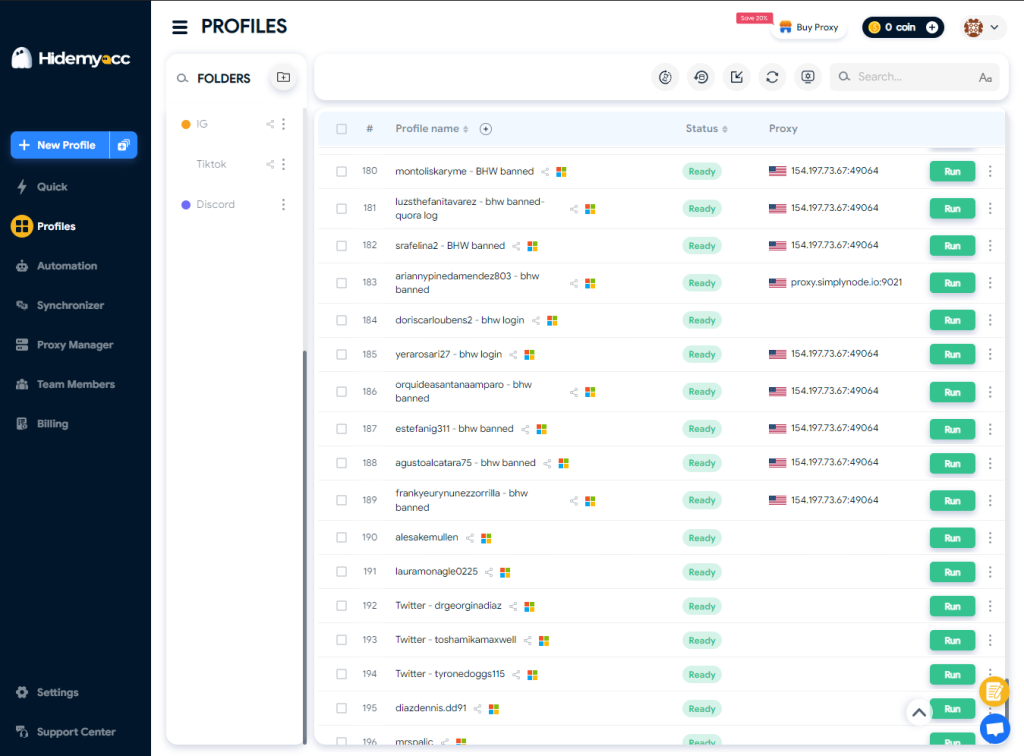
- It lets me create separate browser profiles, each with its own fingerprint. Each profile looks like a different person using a different device—even though I’m on the same laptop.
- I can assign a different proxy to each profile, so every account also has a unique IP address.
- The best part? I can automate tasks like posting, scrolling, or warming up accounts. It saves me hours every week.
- I can even share profiles with teammates or transfer them to other devices. This helps a lot when I work with assistants or clients directly.
I’ve used other tools before like Multilogin and Gologin, but I found Hidemyacc to be simpler and more affordable for beginners. Plus, they offer free proxies and a 7-day trial to test things out.
What other users are saying
If you check Trustpilot, you’ll see that many users agree. Hidemyacc has a 4.9/5 rating with hundreds of reviews. People often say it’s easy to use, helps avoid bans, and has great support.
One user mentioned, “No more bans or checkpoints—only Hidemyacc has delivered the best results.” Another shared, “I’m not a tech person at all, but it just works.”
That matched my own experience. Once I switched, the number of account bans dropped to zero.
Quick tips for beginners
If you’re just starting to manage multiple accounts, here’s what I’d recommend:
- Use a different profile for each account. This keeps fingerprints separate.
- Always add a proxy. Even free proxies can help avoid IP bans.
- Avoid logging into accounts manually over and over. Automate warm-ups and use scheduling tools.
- Keep a simple spreadsheet to track which proxy and profile go with each account.
- Don’t rush. Warm up new accounts slowly. Don’t spam or behave like a bot.
Final thoughts
Managing multiple social media accounts doesn’t have to be hard—or risky. You just need the right tools and a bit of planning. For me, using an antidetect browser like Hidemyacc made all the difference. It helped me scale my work, save time, and protect my accounts.
If you’re new to all this, start small. Try the free trial, learn how profiles work, and build from there. You’ll be surprised how far you can go once you manage your accounts the smart way.